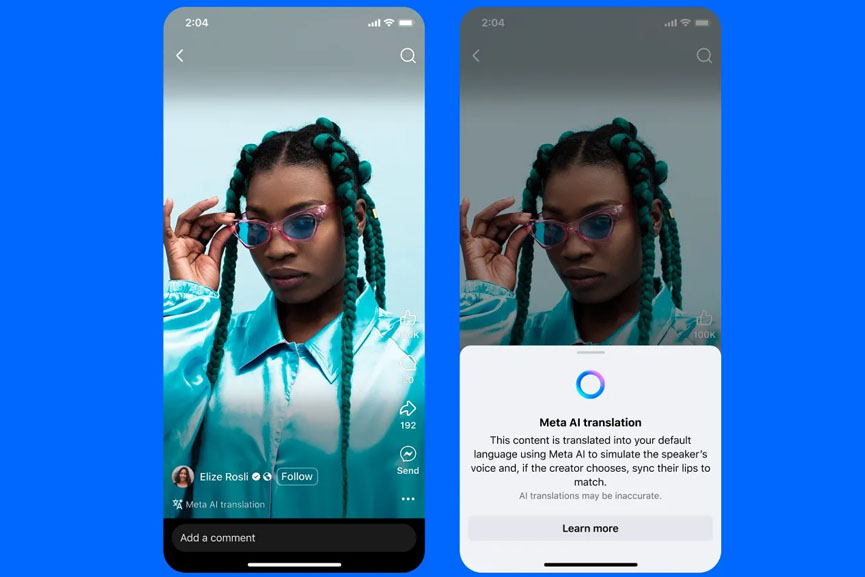
Meta announced that it is expanding the AI-powered voice translation feature globally on Facebook and Instagram, allowing creators to automatically translate spoken content into multiple languages.
Initially, the translations are available in a limited number of languages. Powered by generative AI, the feature can translate spoken content and optionally synchronize lip movements to match the new language.
According to the statement, the Translated Reels are shown in the viewer’s preferred language, accompanied by a note indicating the translation was powered by Meta AI.
Instagram and Facebook Now Support Meta AI Translations in 2 Languages
Through a blog post, Meta announced that it is expanding Meta AI Translations that, once enabled, can automatically dub and lip sync reels into another language. This tool allows users to speak to viewers in their own languages and helps creators to reach and better connect with audiences all over the world.
Meta said that the AI Translations mimics the sound and tone of your own voice, making the translated audio feel natural and true to you. The lip-syncing feature aligns your mouth movements with the translated speech, creating the effect that you’re speaking the language. Users can enable or disable the feature, and review or remove translations whenever they like.
The new Meta AI Translations are initially available for English-to-Spanish and Spanish-to-English. The social media giant has plans to support more languages soon. The feature is accessible to Facebook creators with at least 1,000 followers and all public Instagram accounts.
How to use Meta AI Translations on Facebook
Before publishing your reel, tap Translate your voice with Meta AI, then toggle the options to enable voice translation and lip syncing if desired.
Click Share now to publish the reel with translation in English or Spanish.
If you’d like to preview the translation first, enable the review toggle.
You’ll then get a notification (or check the Professional Dashboard) to review and either approve or reject it. This won’t affect your original reel.
Translated reels are shown to users in their preferred language, with a note indicating they were translated by Meta AI. Viewers can opt out of translations for specific languages by selecting Don’t translate in the audio and language section within the three-dot settings menu.
After publishing translated content, you’ll get a new view breakdown by language. This lets you quickly see which languages your audience is watching in, helping you gauge the performance of your translations.
Meta recommends using the AI Translations feature mainly for face-to-camera videos for the best results. Users should face forward, speak clearly, and keep their mouths visible. On Facebook, translations support up to two speakers, and it is best to avoid overlapping speech. Also, keeping background noise and music minimal helps ensure more accurate translations.
Additionally, Meta confirmed that creators with a Facebook Page can now upload up to 20 dubbed audio tracks to a single Reel to reach a wider audience. Viewers will hear your reel in their preferred language. Users can head to the Reels composer in Meta Business Suite, check Upload your own translated audio tracks under Closed captions & translations, then upload and tag each track with the corresponding language.